
How to Fix an Overexposed Photo (and What Never Comes Back)
Updated 2026-11-18
Short answer: lower Exposure, and everything in the picture that did not turn pure white comes back. The areas that did turn pure white do not come back: they return as flat gray, because a white pixel no longer holds what was there.
We measured this instead of asserting it. We made overexposed versions of three pictures, fixed them with the Adjust panel's own Exposure and Contrast, and counted what came back and what did not. The numbers, the pictures and a plain list of steps are below.
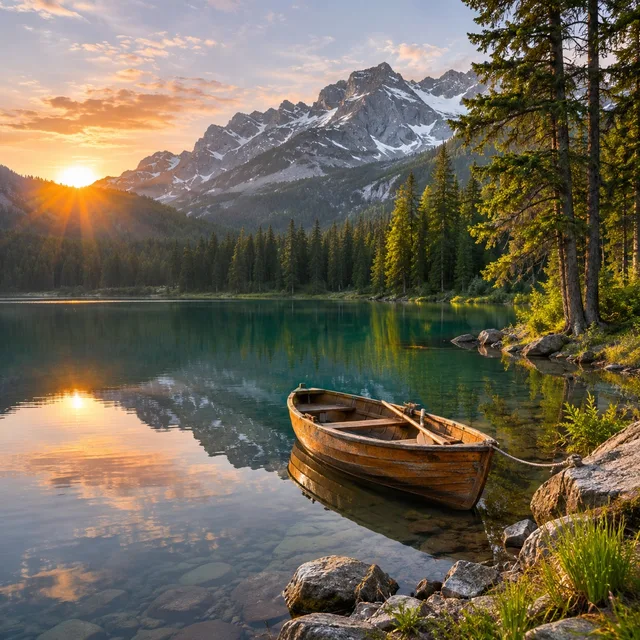
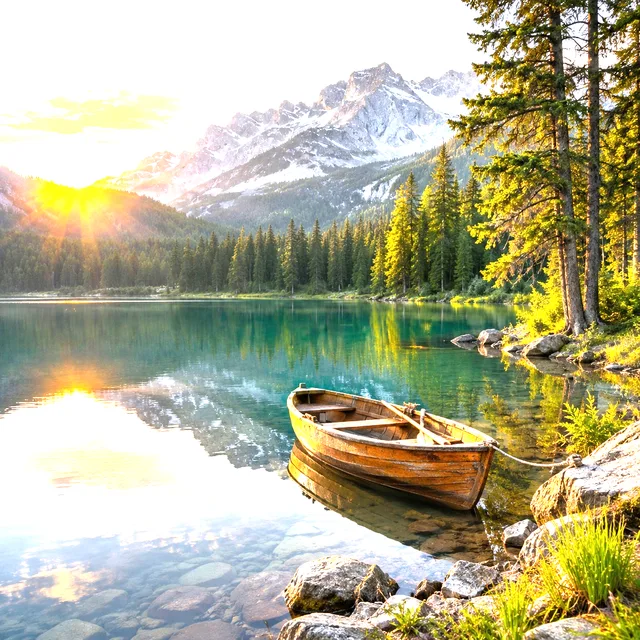
How we measured. We took three pictures made in FlowPix earlier (a portrait, a lake with a rowing boat, a dog), each 1,024 × 1,024 pixels. We made them too bright ourselves, with the Adjust panel's Exposure at +0.5 and at +1 (+1 doubles every value, +0.5 multiplies it by about 1.41), because then we know exactly what each picture was. We ran the fixes with the real Adjust code in a real browser (Chromium): Exposure moved back down by the same amount, and then Contrast +0.3. Everything ran on this computer; no model was used and nothing was uploaded. A real overexposed photo is not this tidy, and one section says what changes.
What goes wrong in an overexposed photo
Each pixel holds three values (red, green and blue), each from 0 to 255. Too much light, or too much Exposure, pushes a value past 255, and it stops there. A pixel with all three values at 255 is pure white, and every pure white pixel is the same, whatever it was before.
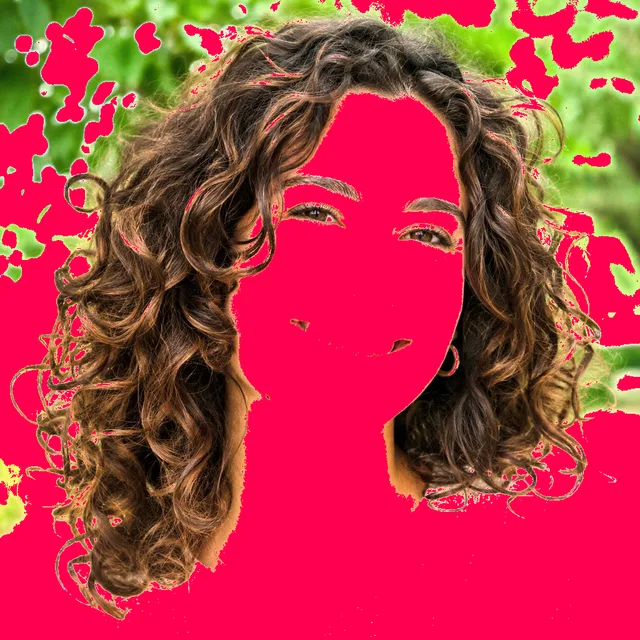
How much of a picture this takes depends on the picture. At Exposure +1, the portrait had 46.4% of its pixels with at least one value stuck at 255, and 24.6% of its pixels pure white. The pink in the third picture marks the pixels with a value at 255.


Exposure down: what comes back
We moved Exposure back down by the same amount we had raised it, which is the best case, because the amount is known. Every pixel that had not reached 255 came back exactly: across all six pictures and amounts, the largest difference on any of those pixels was 0, on the scale of 0 to 255.
The pixels that had reached 255 did not come back. The last column of the table is their average difference from the original, in the same units: 18.6 for the portrait at +0.5 and 41.6 at +1. The lake and the dog show the same split; only the share of pixels that reached 255 is different.

| Picture | Exposure | Pixels with a value at 255 | Pure white pixels | Average difference after the fix: pixels that never reached 255 | Average difference after the fix: pixels that reached 255 |
|---|---|---|---|---|---|
| Portrait | +0.5 | 29.1% | 11.8% | 0 | 18.6 |
| Portrait | +1 | 46.4% | 24.6% | 0 | 41.6 |
| Lake | +0.5 | 23.3% | 7.6% | 0 | 17.0 |
| Lake | +1 | 37.3% | 23.8% | 0 | 41.9 |
| Dog | +0.5 | 14.9% | 0.6% | 0 | 10.4 |
| Dog | +1 | 46.8% | 7.5% | 0 | 20.6 |
The white areas come back as one flat gray
Look at the pure white pixels only, the ones with all three values at 255. In the original portrait they hold 24,623 different colors: skin, leaves, sky. After Exposure +1 they are all one color. After Exposure is moved back down they are still one color, a flat gray. For the lake it is 34,735 colors down to one, and for the dog 25,318 down to one. At Exposure +0.5 it is 6,098, 9,234 and 2,977 colors, each down to one.
That is the whole limit of the fix. A value of 255 means 255 or more, and the file does not say how much more. No setting can tell those pixels apart again, because they are the same pixel.
What Contrast does, and does not do
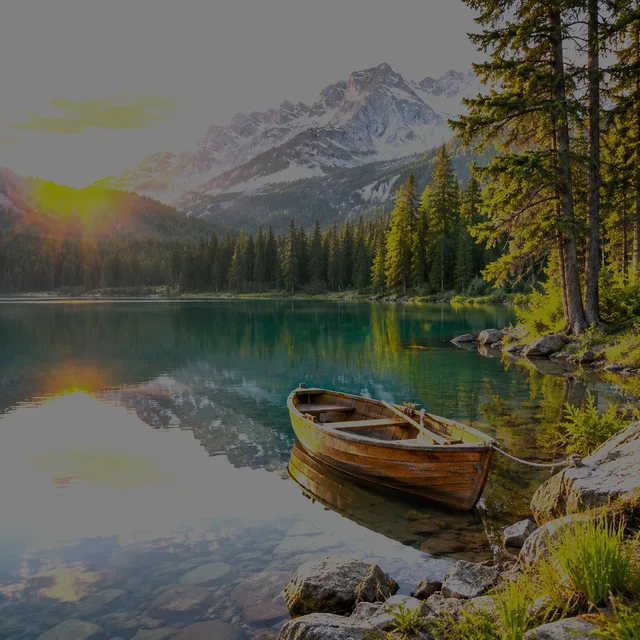
After Exposure was moved back down, we added Contrast +0.3. It makes the picture look stronger, with deeper darks. It changes the colors of the pixels that are there; it does not add any. In the pure white areas the number of different colors was still one, in all three pictures and at both amounts of Exposure.

A real overexposed photo is harder than this test
In our test we knew exactly how much we had added, so we could take exactly that much away. With a real photo you do not. You choose Exposure by eye, and you stop when the bright parts look right, which is usually before the rest of the picture does.
What we measured is therefore the best case. Whatever you do with Exposure and Contrast, what was pure white in the file stays one color. If most of a face or a sky is pure white, the picture can be toned down but not saved. If only a small part is, a lower Exposure can make the picture look right.
Fixing an overexposed photo in FlowPix
These are the steps we used, in the order we used them.
- Put the photo on the canvas, select it and open Adjust.
- Under Light, move Exposure down a little at a time and watch the bright areas. Stop when the areas that still have detail look right.
- Add a little Contrast if the picture now looks flat.
- Press Save as new image. You get a new picture, and your photo stays as it was.
If the picture is too dark instead, the same panel brightens it: see the page on brightening an image, linked below.
Questions about overexposed photos
How do you fix an overexposed photo?
Lower Exposure until the bright areas that still show detail look right, then add a little Contrast if the picture looks flat. In our test this brought back every pixel that had not turned pure white, exactly. The pixels that had turned pure white come back as flat gray.
Can you recover blown-out highlights?
Not the detail inside them. In our test, 24,623 different colors in the pure white areas of the portrait became one after Exposure +1, and stayed one after Exposure was moved back down and after Contrast +0.3. What you can do is make them less bright, so the white no longer glares.
Why does the white area turn gray when I lower Exposure?
Because white is the largest value, 255 in each color, and lowering Exposure scales every value down. All the pure white pixels were the same, so they become the same gray together. Nothing extra is lost: it is the single color they already were.
Does Contrast fix an overexposed photo?
It does not bring detail back. Contrast changes the colors of the pixels there are, and in our test the pure white areas stayed one color after Contrast +0.3. It helps a picture that looks flat after Exposure was lowered.
Does fixing the photo change my original?
No. Press Save as new image and you get a new picture. Your photo stays as it was.
How much of a photo can be overexposed and still be fixable?
There is no fixed number. It depends on how much of the picture is pure white and how much the picture needs that part. In our test the share of pure white pixels ran from 0.6% (the dog at Exposure +0.5) to 24.6% (the portrait at +1), and every pixel that was not pure white came back exactly.